Getting Started Guide
GHub Platform · Гайд · 0 ответов · 13 просмотров
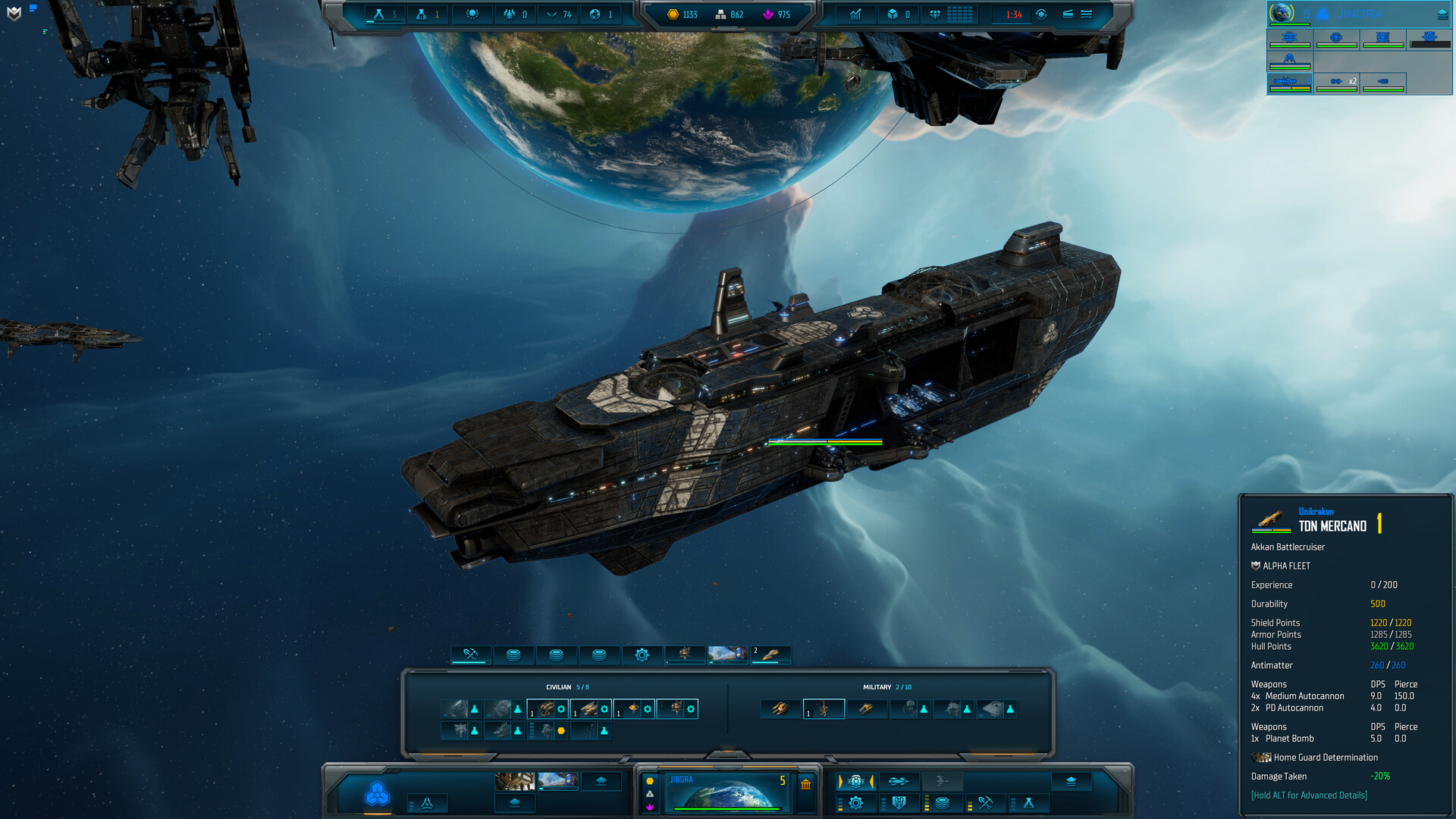
Upon launching the game, the game will open on the Single Player tab. Under [1] you will find a list of amazing in-game tutorials, which will help you understand how to play the game. Those vary from the most basic camera controls to some of the more sophisticated empire mechanics. But assuming you want to dive into playing, let’s stay in the “New Game” tab. At [2] you can see 4 boxes, which represent map sizes. Sins 2 has a lot of maps, and those filters help you a lot in setting up the best lobby you desire. Note: While less players usually means smaller map, those filters actually filter based on player count. At [3] you can see the currently selected map “Agamemnon’s Bounty”. This line also holds info on amount of maximum players and the shortest time (best win) you ever had on the map. At [4] there is detailed information on the selected map. Specific stats are self explanatory, but before you become an experienced player, I recommend checking the “resources” tab, as it provides you with crucial information on how the map will play. Finally at [5] we can begin setting up our lobby. Next menu will pop where you will be able to set up your lobby. If you want to start as quickly as possible, you can simply hit “Start Game” [8]. But for your first game, I recommend you go with TEC Enclave as they bring the most intuitive design. Which is to be expected, as they are humans, and not aliens. If you choose this faster option, you can go directly to the topic “Game Start”. Below you can find more detailed description of the menu: Number Description Customizing your empire can be a minigame in itself. Here you can pick your icon (flag), colors, and portrait used in diplomacy. And the best part is – you can directly see how your fleet will look based on your customization! Number Description At first glance your game screen will have a lot of elements. But don’t worry, we will go through them. The following screenshot focus on the most important stuff you will need for your first steps out there in space: Number Description Capital ships play a crucial role in Sins of a Solar Empire II. They are not just “bigger” ships. They are more like “hero ships”. Very expensive, but every single one of them has a set of unique abilities. As usual, you can hover your mouse over every capital ship, and read through its description and stats. Pro newcomer tip – use “backspace” hotkey to pause/unpause the game, while reading. A cool thing about those capital ships is that the first one is free and instantly built. So, you do not have to worry about breaking your economy, and do not need to “optimize” the time you build your first one, as you can always build one immediately. As this is your first playthrough, you should go with the “Akkan Battlecruiser”, as this capital ship provides various economic abilities, but most importantly allows you to colonize planets without the need of bringing in a specialized frigate. Below is the screenshot of the Akkan’s stats and abilities: And here it is, in its beauty: There are 2 important fields to know about: Here you see all possible abilities for your capital ship; each capital ship has 4 of them. Maybe you have noticed that the 4th ability does not have a golden arrow above it. That’s because the 4th ability is also always the ultimate, which can be chosen only once you reach level 6. Oh yes, your capital ships do have levels! They gather experience from kills. Please note, that you only need to be in the gravity well, where the kill happens. The capital ship does not need to destroy targets personally. Your first ability should be “Colonize” as it will allow you to colonize neutral planets, while also providing a small economy boost. This will be new even for those of you who are familiar with Sins: Rebellion. Capital ships get not only fancy abilities, but also fancy “modules”. We will explain modules in depth in one of our future guides, however, for now it will be enough to know that modules are faction specific. Meaning there will be some differences between factions and a lot of differences between races. Now, we do want to keep a constant eye on our Akkan, so we should add him to our “empire tree” (top left). For that, we select our Akkan, move our mouse to top left of the screen, just below our homeworld icon, and right click with the mouse: Now we will be able to access our Akkan at any time, by pressing on that “fleet” at top left: Now, what’s even cooler – we can reinforce our fleet, with new ships joining our main forces from the new menu. If we were to click on the “Beta Fleet”, a fleet construction menu will pop up: Here we can order ships, and the best part is – it will produce them at the nearest factories. This reduces the micromanagement a lot, and allows you to focus on those beautiful fights! You can now zoom out (with the mouse wheel). Since you always start with 2 free scouts, they will have scouted a few planets for you by now. Below is a standard picture that you will see at the beginning of most of your games. Number Description At last, we do want to expand our empire. In order to do so, we will send our Akkan to a nearby asteroid. Once you are zoomed out, there are several ways to select your Akkan: Number Description It’s time to talk about economy. Your planets are your main source of income. At the start of the game your options are limited, since you do not have the technologies required for more sophisticated sources of income. The only options available to you is to upgrade the planet itself. To boost your credit income, you will want to upgrade your “commerce” [1], and to boost your metal & crystal income you will want to upgrade “mining” [2]. You can do this at any planet, including your homeworld. BE AWARE: Each upgrade increases the cost of every next upgrade across all fields of planetary upgrades. So it is better to have a somewhat underdeveloped planets, rather than getting every single possible upgrade. Later into the game, you will be able to build several structures to boost your economy. Structures consume slots, so you will also need to upgrade “logistics” [3] for that. Economy structures include: mining extractors [4], trade ports [5], exotic refineries [6] and broadcast centers [7]. Mining extractors are straight forward – they mine crystal or metal. Trade ports on the other hand are rather sophisticated and will be discussed in our economy guide. But those can produce all the main resources: credits, crystal and metal. Exotic refineries allow you to create “exotic resources”, which will be used for capital ship production and other high-tech stuff. Broadcast centers provide a small economy boost. Derelicts are a completely new feature in Sins II. Those are pyramid shaped treasures. They will contain a random set of resources, including exotic ones. They will also provide your capital ship with a lot of experience, giving you the edge over your opponent. However, derelicts are always protected. Sometimes so heavily that you will be unable to claim them until the late game hits in. You can still colonize planets where derelicts are, as derelict “neutrals” will always stay close to the derelict itself, allowing you to safely fly by. In this specific screenshot, my first asteroid had a derelict with 702 metal, 437 crystal, 500 experience for my capital ship, and 1 exotic resource – “Andvar”. That’s quite a lot to boost my economy at the start! To capture derelicts, your capital ship has to stay close to it for 60-120 seconds. If your capital ship is idle, it will also fly into the capture zone of the derelict by itself. This guide cannot cover the entire research tree, but it’s important to explain how the tree works. It is divided into 2 categories “civilian” and “military”. The names are self-explanatory. A new mechanic in Sins II is that there are “researchable tiers” of technology. In the screenshot above you can see the first tier of civilian tree is “Civilian 1”. I
ИсточникGHub Platform · автор06.09.2026, 05:34:52
Upon launching the game, the game will open on the Single Player tab. Under [1] you will find a list of amazing in-game tutorials, which will help you understand how to play the game. Those vary from the most basic camera controls to some of the more sophisticated empire mechanic…
Войдите, чтобы писать в группе