How to create all T1 Affix Memories
GHub Platform · Гайд · 0 ответов · 23 просмотра
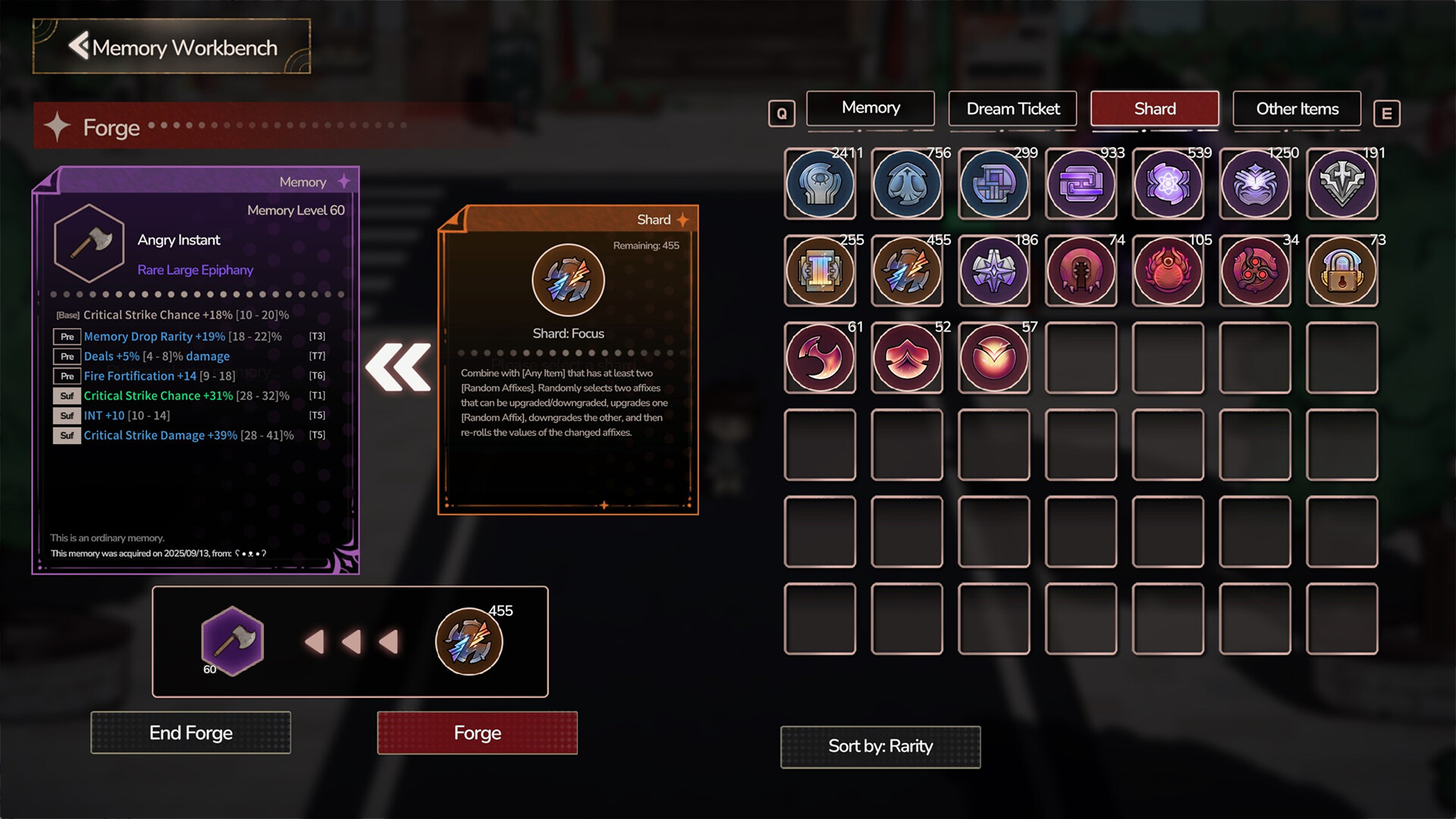
This guide explains how to create full T1 Affix Gear in DreamEchoes. Before we begin, it’s important to address one thing: this method uses save scumming . Save scumming means creating a manual save right before a major or risky action so you can reload if the result isn’t what you want. You can craft full T1 gear without save scumming, but doing so requires a significant amount of time and luck. If you prefer not to save scum, the steps still apply — you’ll simply need more patience . Your first decision is which Memory you want to craft and what rarity you’ll be using. Rare Memories Up to 6 random affixes (3 Prefixes, 3 Suffixes). Legendary Memories Up to 2 random affixes (1 Prefix, 1 Suffix) plus a legendary affix. Not recommended for T1 crafting due to limited affix slots. Primeval Memories Up to 4 random affixes (2 Prefixes, 2 Suffixes) plus a legendary affix. If you want a specific legendary affix, wait until you obtain a Primeval version. You can still use Legendary Memories but don't stress to much on making them perfect. They simply don’t offer enough flexibility. The choice between a Rare Memory and a Primeval Memory comes down to how much value the legendary affix provides for your build. If the legendary affix doesn’t meaningfully support your setup, you’ll generally get more mileage from using a Rare Memory instead. Example Memory Build Here’s an example weapon memory to illustrate how legendary affixes can synergize with your build. Weaver's Eye — Insidious Instant Base affix: Increased Critical Damage Legendary affix: Your hits cannot miss This pairs extremely well with the aptitude node Strike the Vital Point, which states: “Your hits have 50% chance to miss, your Crit Rate is always 100%, and you have 30% More Critical Damage.” The legendary affix removes the downside of the 50% miss chance, and the node guarantees 100% Crit Rate, giving you consistent bonus damage. Not all Memories can roll the same affixes. For example: Insidious Instant rolls player-based affixes . Soul-Gathering Instant rolls minion-based affixes . To check what a Memory can roll, use the Affix Library. Controller Players: Press Left Stick in the Forge Mouse and Keyboard: Open the HTML file located in your DreamEchoes steam folder. In my case the location is E:/SteamLibrary/steamapps/common/DreamEcho/DreamEchoes_Data/StreamingAssets/WikiWeb/affix_browser-en.html This library shows every possible prefix, suffix, and corruption for each Memory. I'll discuss corruptions later. To craft your T1 Memory, you’ll need: 8 Concept Shards (4 optional) 2 optional Cards 1 additional optional shard for minmaxing Four Main Shards Used Four Optional Shards 2 Optional Cards Optional Mixmax Shard This process will be sectioned into 7 steps. Step 1: Rolling Your First Desired Affixes Step 2: Upgrading Prefixes to T1 Step 3: Building Your Suffixes Step 4: Removing the Final Trash Affix Step 5: Adding the Final T1 Affix Step 6: Optional Value Min‑Maxing Step 7: Final Optional Step: Corruption (High Risk) Rolling Your First Desired Affixes Start with Shard: Restructure . Use this shard repeatedly until you roll at least two desired Prefixes or Suffixes. Focus on either Prefixes or Suffixes first, not both. This matters later when using optional cleanup shards. For this guide I will be focusing on prefixes first; however, if you want to do suffixes first the steps still apply just interchange prefix and suffix in the guide. Aim for T1–T3 tiers. Anything lower becomes difficult to upgrade. Before After Upgrading Prefixes to T1 Once you have your initial desired Prefixes, use Shard: Focus . Your goal: all three Prefixes at T1. Important Warning Shard: Focus upgrades one affix and downgrades another. If your tiers are mismatched (e.g., T1, T2, T7), you may be unable to reach T1 on all affixes because: T1 can only downgrade T7 can only upgrade T2 can upgrade to T1, but doing so forces T1 to downgrade to T2 This can trap you in a loop. Aim for T3 or higher when rolling your initial desired affixes. Four affixes initially are ideal for this setup but you can have more. It just adds more randomness to Shard: Focus . Once all Prefixes are T1, move on to Suffixes. Building Your Suffixes Suffix crafting uses a combination of shards and optional cards. Main Removal Tool Focus: Trimming — removes the lowest‑tier affix. Since your Prefixes are all T1, Focus: Trimming will always remove an unwanted Suffix in this scenario. Adding New Suffixes Use Shard: Divergence to add a random affix. At this stage, Shard: Divergence will only add Suffixes. Aim for T1–T3. Anything lower becomes difficult to upgrade. This is very unlucky. It is salvageable though. If you roll something unusable (e.g., T4 or worse), you can: Use Shard: Focus in an attempt to raise the T4 to T3 by lowering one of the T6 to T7. Your T1 have the possibility of being lowered though. Repeat in hopes that Shard: Focus lowers the second T6 to T7 while upgrading the T3 to T2. Use Focus: Trimming to remove a T7 affix. Add another Suffix using Shard: Divergence . Try again with Shard: Focus . Repeat this cycle until you have five T1 affixes. Optional Cleanup Shards If you dislike the Suffixes or Prefixes you’re getting you can use one of the two optional shards. Focus: Extension — removes all Suffixes Focus: Introversion — removes all Prefixes These save your valuable Focus: Trimming shards. This is why you should complete Prefixes before Suffixes and vice versa. Removing the Final Trash Affix Once you have 5 T1 affixes and 1 unwanted affix, use Focus: Trimming to remove the trash affix. Up to this point, everything can be done without save scumming. Adding the Final T1 Affix This is the step where save scumming becomes extremely helpful. Use Shard: Divergence or an optional Card to add your final affix. If you roll T2–T7, remove it with Trimming. If you roll a T1 you don’t want, you cannot remove it because all affixes are T1. Without save scumming, you are at the mercy of RNG. Jump to the Save Scumming section if you're interested. Using Cards Instead of Shard: Divergence Golden Spirit – Upright → Prefix Golden Spirit – Reversed → Suffix These cards always apply affixes at Level 42+, which usually means T4 or better. This removes low‑tier rolls and greatly improves consistency. Repeat adding, trimming, and reloading until you get your final T1. Optional Value Min‑Maxing Use Shard: Refinement to reroll the numerical values of your affixes within their allowed ranges. If you get a value you like, you can save scum Shard: Lock to lock one affix’s value. The locked affix is random, so save beforehand and reload until it locks the one you want. Final Optional Step: Corruption (High Risk) The last optional shard is Erosion: Upheaval . This shard can: Add up to two corruption affixes Completely reroll every affix on your Memory Do nothing at all Once corrupted, a Memory cannot be changed in the Forge. Only attempt this with save scumming — and only if you’re willing to risk losing everything you’ve built if not save scumming. The Weaver's Eye I showed at the beginning of the guide is an example of a memory that has been corrupted by this shard. Even with save scumming this step can take a very long time to get your desired corruption due to RNG and the process of constantly applying your backup save. Save Scumming Method Exit to main menu. Go to your save folder. For Windows Users you can copy and paste %userprofile%\AppData\LocalLow\Echoes\DreamEchoes into the address bar of the File Explorer. Create a backup folder. Copy save_001 (or whichever slot you use) into the backup. Copy the save you just copied. Whenever you need to retry, overwrite your current save with the backup by pasting. You can go even further and make a backup copy of your backup so you don't accidentally paste over your backup. This is a single player game. If you choose to save scum that is entirely your choice. Personally, I'm not a fan of save scumming if the
ИсточникGHub Platform · автор06.09.2026, 08:04:50
This guide explains how to create full T1 Affix Gear in DreamEchoes. Before we begin, it’s important to address one thing: this method uses save scumming . Save scumming means creating a manual save right before a major or risky action so you can reload if the result isn’t what y…
Войдите, чтобы писать в группе