X-COM: UFO Defense [OpenXCom + Steam Timer + Steam Overlay]
GHub Platform · Гайд · 0 ответов · 3 просмотра
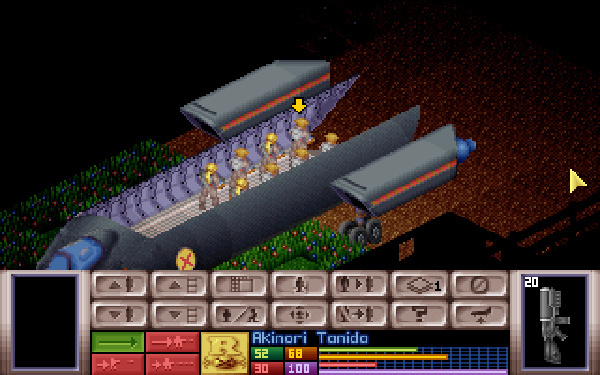
According to OpenXCom website OpenXcom is an open-source clone of the original UFO: Enemy Unknown (X-Com: UFO Defense in USA), licensed under the GPL and written in C++ / SDL. It was originally founded by SupSuper in February 2010, and has since grown into a small development team surrounded by a very supporting community. The goal of the project is to bring back the tried and true feel of the original with none of the issues. All the same graphics, sound and gameplay with a brand new codebase written from scratch. This should give it: Fixability : Play the game natively without any need for emulators or fancy hacks, with none of the limitations and bugs that plagued the original. No more 80-item-limit, personnel limits, funding overflows, disconnected facilities, broken proximity grenades, floating soldiers, etc. Moddability : Tweak the game to your heart’s content. Sure the original was pretty good, but maybe you just think it could be that bit better. A nicer base layout, better laser weapons, maybe challenge yourself with a custom game mode, or just put in all the crazy stuff you’ve always wanted! None of it is hardcoded. Flexibility : Port the game to any platform you like, customize it to your liking, or use it to make your own far-fetched remakes. The code is fully documented and open-source so anyone can take a crack at it. Project website: https://openxcom.org/ Project information and FAQ: https://openxcom.org/about/ Project Wiki: https://www.ufopaedia.org/index.php?title=OpenXcom Download latest OpenXCom build from from https://openxcom.org/git-builds/ either as .zip or .exe file. Unpack .zip file and copy everything to C:\Program Files (x86)\Steam\steamapps\common\XCom UFO Defense\XCOM or install .exe file to C:\Program Files (x86)\Steam\steamapps\common\XCom UFO Defense\XCOM. We will focus on installer because just copying files is too easy for boomers and too hard for milennials; what is folder anyway? :) Installer will create folder named OpenXCom filled with "stuff" inside your chosen XCOM folder. Steam version has latest patch of tha vanilla game included but I always tend to select Data Patch while installation without any issues. You should install OpenXCom on fresh Steam installation. If you played game before, You should uninstall it and remove any files from or just delete XCom UFO Defense folder in Steam directory and install fresh game. Fresh = No mods. Screenshots from installation process: After that you may start game from OpenXCom shortcut to see if everything works fine. If so and you want to just play game and not integrate it with Steam you stop here. If you want Steam integration (launching directly from Steam, Steam time count, Steam Overlay, Steam screenshots) check next parts of this guide. Go to your C:\Program Files (x86)\Steam\steamapps\common\XCom UFO Defense\XCOM\OpenXcom folder and: rename openxcom.exe to dosbox.exe copy content of C:\Program Files (x86)\Steam\steamapps\common\XCom UFO Defense\XCOM\OpenXcom folder to C:\Program Files (x86)\Steam\steamapps\common\XCom UFO Defense folder; overwrite if prompted delete empty C:\Program Files (x86)\Steam\steamapps\common\XCom UFO Defense\XCOM\OpenXcom folder Now game in modded OpenXCom version will run directly from Steam. Steam will also count time you spent in this modded game which is lovely. Isn't it? To be able to use the Steam overlay, you need to use an OpenGL Display Filter in the Video Options. Here is screenshot with my settings: Every Display Filter with asterisk (*) is sufficient and choosing one is a matter of personal preference. Let's Play X-COM: UFO Defense (OpenXCom) from GeneralConfusionPlays in which he explains basics of OpenXCom and gameplay: https://www.youtube.com/watch?v=eH21vRGW_PY&t=244s It is not full playthrough though. Let's Try OpenXcom 1.0 playlist from Ivan Dogovich : https://www.youtube.com/watch?v=rNneKAwvjoU&list=PLgSfydyBKNBAl0CmjVEUOypNVGpkSt3lV A bit old but gold. And his channel as a whole is even better. Pure diamond mine for X-COM: UFO Defense fans. Final Mod Pack for OpenXcom published by Solarius_Scorch : https://openxcom.mod.io/final-mod-pack . This is huge multimod with a high level of internal intricacy. The original game has been expanded in many ways: new weapons, new aliens, new UFOs, new missions, new terrains... --- Источник: https://steamcommunity.com/sharedfiles/filedetails/?id=2635114274
ИсточникGHub Platform · автор10.09.2026, 13:00:00
According to OpenXCom website OpenXcom is an open-source clone of the original UFO: Enemy Unknown (X-Com: UFO Defense in USA), licensed under the GPL and written in C++ / SDL. It was originally founded by SupSuper in February 2010, and has since grown into a small development tea…
Войдите, чтобы писать в группе